 KH Lab
Class Project: Synapse Categories
Overview
Weeks 7 and 8 of the class research project. Expected time: one class period, with a little of the next class if you need it.
Your first task on your group's dendrite is to sort every protrusion and synapse into two kinds of category:
- Where the synapse is (the spine and synapse type, below).
- The shape of the synapse: perforated, horseshoe, segmented, or macular (non-perforated), using the definitions in Nicholson et al. (2004), Fig. 1.
Spine and synapse types
Find each protrusion stamp (p) on your dendrite and follow it out to its tip. Each one is one of these:
| Type | What you see | Synapses |
|---|---|---|
| Single-synapse spine | One neck and one head, with one synapse on the head. This is the most common type. | 1 |
| Branched spine | One origin on the dendrite that splits into two necks, each with its own head. | 1 on each head |
| Multisynaptic spine | One neck and one head, with a second synapse somewhere else on the spine: usually on the neck or the base, sometimes on the back of the head. The second synapse is usually inhibitory, but not always. | 2 or more |
| Non-synaptic protrusion | A protrusion with no synapse on it. | 0 |
Synapses on the dendrite itself, not on a protrusion, are shaft synapses. A shaft synapse can be excitatory or inhibitory.
How to count them:
- Branched spines: count each head as its own spine. The two heads usually get input from two different axons, so each head counts almost like a typical (single-synapse) spine.
- Multisynaptic spines are atypical. One spine gets two competing inputs, usually one excitatory and one inhibitory (not always mixed). Keep them out of the typical-spine sample and count them as their own group.
- Non-synaptic protrusions and shaft synapses are also counted as their own groups.
Naming synapses on one spine
The synapse (c) and contact flat area (cfa) names use a letter for each branch and a number for each extra synapse on that branch:
| What | c name | cfa name |
|---|---|---|
| Single-synapse spine 04 | d01c04 | d01cfa04 |
| Branched spine 03, head a and head b | d01c03a, d01c03b | d01cfa03a, d01cfa03b |
| Multisynaptic spine 05: first and second synapse | d01c05a1, d01c05a2 | d01cfa05a1_asym, d01cfa05a2_symm |
| Branched spine 07 with a second synapse on head b | d01c07a, d01c07b1, d01c07b2 | d01cfa07a, d01cfa07b1, d01cfa07b2 |
So a letter alone means a branch, and a letter with a number means the first, second or third synapse on that one branch.
Which head is a and which is b, or which synapse is 1 and which is 2, does not matter. Pick one and keep it the same in the c and cfa names. What matters is that every name is unique and follows this pattern.
To be decided
- How you record the spine and synapse type: in the protrusion stamp's name (for example with suffixes such as
_branched,_multi,_shaftand_nonsyn), or in a custom category like Synapse_type below.
Figure: synapse shapes
Nicholson et al., 2004, Fig. 1. Open the paper.
Have the paper open while you work; this guide covers only how to do it in PyReconstruct.
About your data
- Your series contains your group's dendrite (yellow), its protrusion stamps (p), its synapses (c), and their contact flat areas (cfa). Do not delete or rename any of them.
- This is real data! Some of it has been curated, some of it has not. You may occasionally come across missing, misplaced, or wrong traces. If you see something weird, let us know and we'll take a look.
- Your series may have missing sections or section flaws.
To be decided
Whether the series comes with the synapses already traced, as described here, or with only the dendrite shaft. See Groups and dendrites.
Before you start
- Copy both items for your group's dendrite to your computer and keep them in the same folder: the series file (XXXXX_d###.jser) and its image folder (XXXXX_d###_crop-zarr). Do not rename either one.
- Open the series in PyReconstruct. The first time, it will ask where the images are; select the _crop-zarr folder.
- Set the backup settings to match the following. Open File > Backup > Settings.... Under This Series, uncheck "Use my defaults for this series," click Browse to choose a Backup Folder, and check "Auto-backup (create backup on every save)." Under Backup Naming, uncheck User, check Suffix, and type your user ID in the Suffix box. Click OK.
The pictures and the clip below were made with the starter series (ZGBJY) from Modules 1 to 3. The menus and dialogs are the same for your group's dendrite.

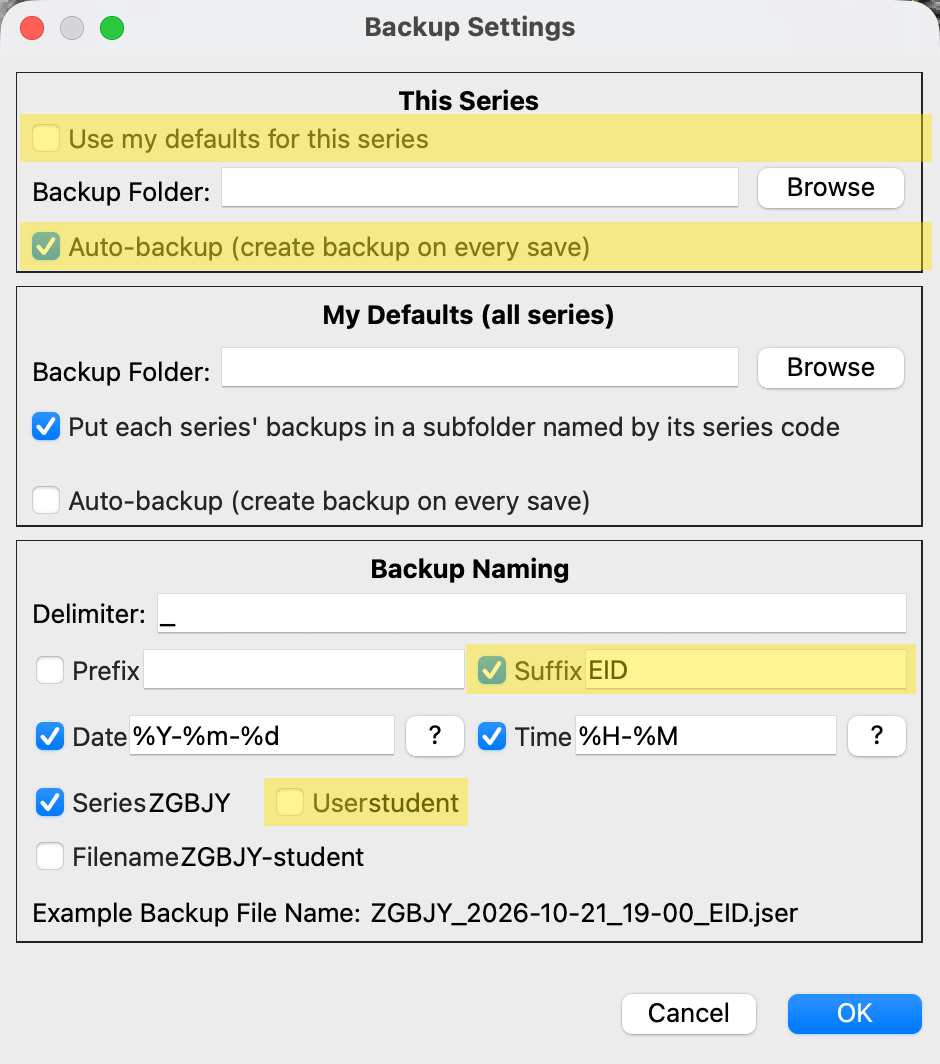
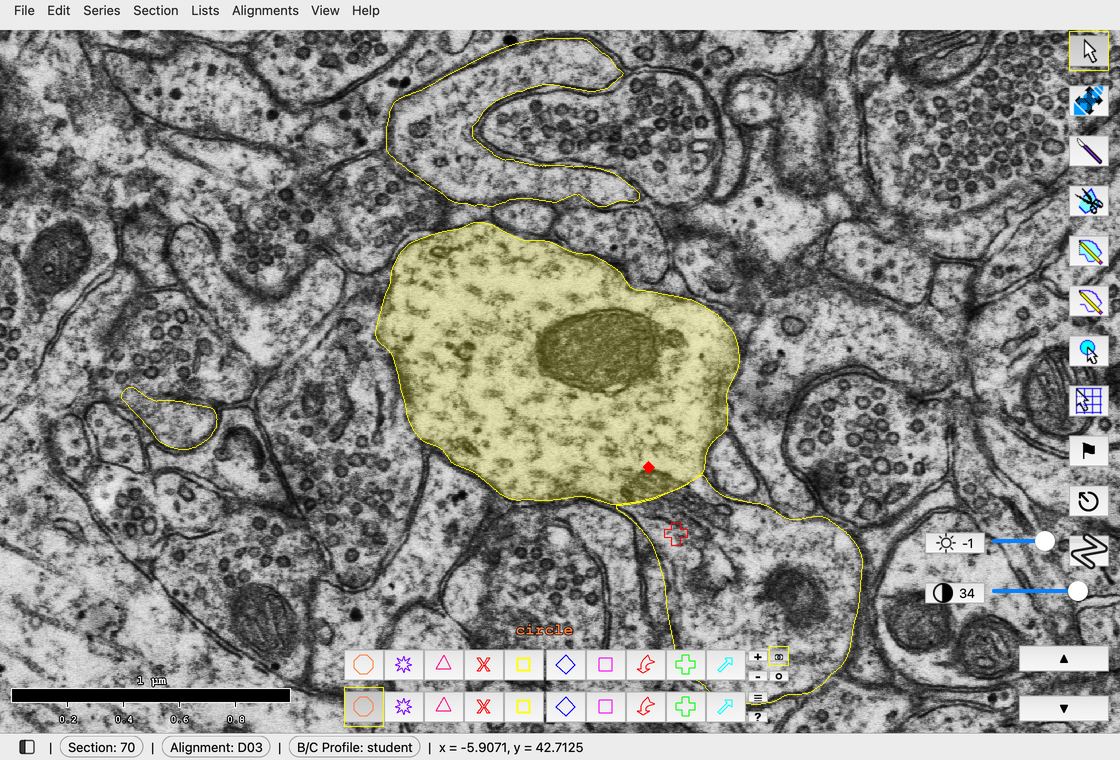
File > Backup > Settings..., then the changes in order, shown with the starter series. Browse is left out here.
Steps
- Open the Object List: Lists > Object list (Ctrl+Shift+O; Mac: Cmd+Shift+O).
- Show only the synapses: in the Object List, Filter > Regex filter... and enter
d\d+c\d.*. This hides the cfa and p objects. You classify the c objects. - Right-click a synapse and choose 3D > Add to scene. Rotate the 3D view until you are looking at the face of the synapse.
- If the synapse looks macular in 3D, record it (step 6). If you suspect it is anything other than macular, go back to the EM images before deciding.
- To check the EMs, select the synapse in the Object List and use Find > Go to first contour (or double-click it) to jump to its first section. The Start and End columns give its first and last sections. Step through every one of them.
- Record your call: right-click the synapse and choose Custom categories > Synapse_type, then pick the type. The value appears in the Synapse_type column of the Object List.
- Save often (Ctrl+S; Mac: Cmd+S).
Notes
- Synapses whose names end in a and b (or A and B) share one protrusion: the two heads of a branched spine, or the two synapses of a multisynaptic spine. The protrusion stamp's name tells you which (
_branchedor_multi). Classify each synapse separately. - Some synapse names end with an axon ID (for example axe110 for axon-excitatory 110). You will still categorize these synapses, just ignore the axon ID.
- Each synapse has a contact flat area (cfa) trace. The cfa is how we measure the size of a synapse. Its name can end with
_symm(a symmetric PSD) or_asym(an asymmetric PSD), for example d01cfa38_symm. Asymmetric synapses are presumed to be excitatory, and symmetric synapses are presumed to be inhibitory. - You do not need to give symmetric (presumed inhibitory) synapses a shape. They are usually on the dendrite shaft or on the neck or base of a multisynaptic spine.
- You are done when no synapse has a blank Synapse_type cell. To review one type at a time, use Filter > Categorical column filters > Synapse_type in the Object List.
- If you choose the wrong type, right-click and choose it again. Choose (blank) to clear it.
"Look and see" (Week 8)
In Week 8 the class takes a second look at the synapse categories.
To be decided
What the "look and see" step asks you to do, and how it uses the categories you recorded in Week 7.
References
- Nicholson DA, Yoshida R, Berry RW, Gallagher M, Geinisman Y (2004). Reduction in size of perforated postsynaptic densities in hippocampal axospinous synapses and age-related spatial learning impairments. Journal of Neuroscience 24(35):7648-7653. doi:10.1523/JNEUROSCI.1725-04.2004